Volume Shader BM : test GPU dans le navigateur
Mesurez les FPS moyens et la stabilité avec un test WebGL 2.0 de 45 secondes sur mobile ou PC. Les 10 derniers résultats restent dans ce navigateur pour comparer les tests dans les mêmes conditions.
Moteur de rendu
Test non démarré
Lancez le test à charge moyenne pour mesurer les FPS pendant 45 secondes. Gardez cet onglet visible jusqu’à la fin.
Appareil et navigateur
Tests enregistrés dans ce navigateur (0)
Les 10 derniers résultats restent dans ce navigateur. La température et l’alimentation influencent aussi la comparaison.
Terminez un test pour créer votre historique local.
Les scènes et charges diffèrent. Comparez les résultats du même moteur.
Qu’est-ce que Volume Shader BM ? Lire les FPSComparaison du rendu WebGL 1.0 et WebGL 2.0
Les moteurs affichent les scènes différentes ci-dessous. Les FPS et les scores ne sont pas directement comparables entre moteurs.
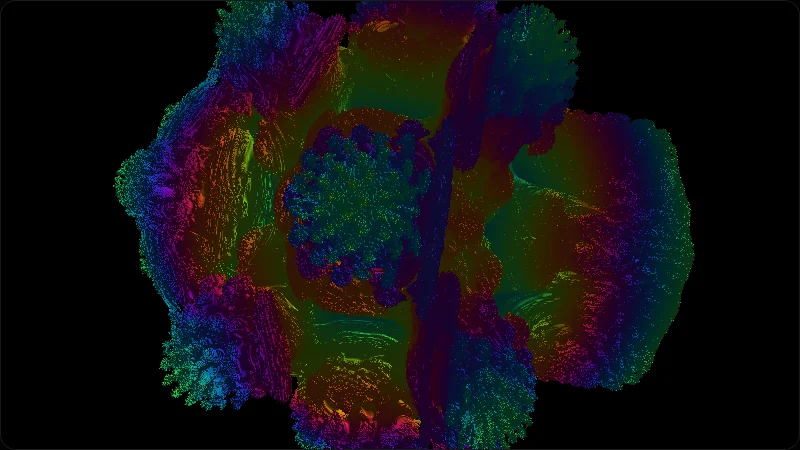
Scène fractale originale WebGL 1.0
La scène utilisée au démarrage de l’algorithme original WebGL 1.0.
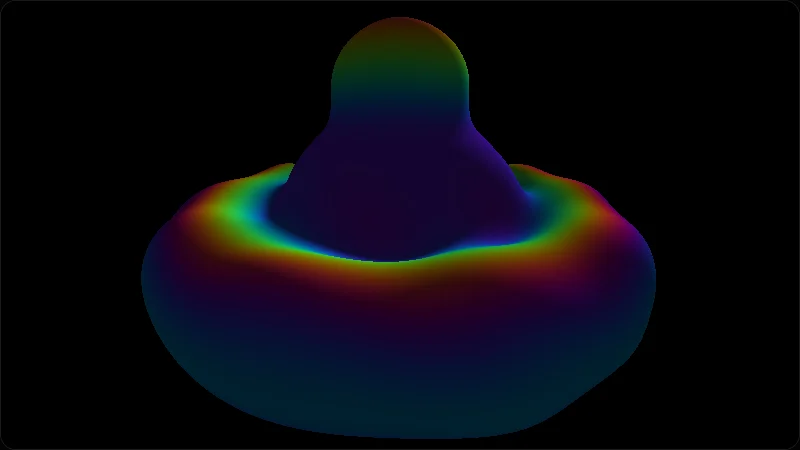
Scène SDF actuelle WebGL 2.0
La scène utilisée au démarrage du test WebGL 2.0.
Les deux captures utilisent la même caméra initiale, une charge moyenne et une résolution de 800 × 450.
Résultats historiques des tests WebGL 1.0
Les relevés publiés indiquent appareil, charge, FPS moyens et score. Consultez les résultats complets pour le navigateur et les conditions.
Ces résultats utilisent le moteur WebGL 1.0 original. Ils ne sont pas comparables au test WebGL 2.0 actuel.
| Appareil | Mode | FPS | Score |
|---|---|---|---|
MacBook Air 13 M1 Apple M1 7-core GPU | Charge moyenne | 52 | 15,600 |
MacBook Air 13 M2 Apple M2 8-core GPU | Charge moyenne | 61 | 18,300 |
Intel UHD 620 laptop Intel UHD Graphics 620 | Charge légère | 42 | 4,200 |
Desktop RTX 3060 NVIDIA GeForce RTX 3060 | Charge élevée | 74 | 37,074 |
Desktop RTX 4070 NVIDIA GeForce RTX 4070 | Charge élevée | 112 | 56,112 |
Ce que mesure ce test
- FPS moyens sous charge de rendu WebGL
- FPS minimum et maximum échantillonnés
- Temps par image et stabilité des FPS pendant le test
- Comparaison de tests dans les mêmes conditions
Mises à jour de la méthode de test
Moteur du benchmark migré vers WebGL 2.0.
Introduction d’une scène SDF maintenue séparément ; résultats WebGL 1.0 marqués comme archive non comparable.
Méthodologie publique, rapports et tableaux vérifiés ajoutés.
Les pages séparent exécution locale et données publiques, et expliquent les limites du score.
Premier article de méthodologie publié.
Modes de test, interprétation FPS et limites de confidentialité documentés.
Lancement initial du benchmark raymarching navigateur.
Ancien moteur publié avec Light, Medium, Heavy et Extreme.
Comprendre les FPS moyens
Les FPS indiquent le nombre d’images rendues par seconde. Ces plages décrivent la charge de ce test.
Au moins 60 images par seconde en moyenne. La fréquence de l’écran peut limiter le résultat.
De 30 à moins de 60 images par seconde en moyenne.
De 15 à moins de 30 images par seconde en moyenne. Essayez le test à charge légère pour mesurer une charge moindre.
Moins de 15 images par seconde en moyenne. Les FPS seuls ne permettent pas d’identifier la cause.
Ces plages décrivent seulement cette charge. Comparez même moteur, mode, résolution et navigateur.
Conseils mobile / tablette
- Gardez la même alimentation et le même réglage d’économie de batterie.
- Fermez les applications en arrière-plan avant de démarrer.
- Commencez par une charge légère ou moyenne, puis augmentez si nécessaire.
- Laissez l’appareil revenir à une température similaire avant de recommencer.
Conseils Chrome / Edge / Safari
- Activez l'accélération matérielle dans les paramètres du navigateur.
- Sur Chrome / Edge ouvrez chrome://gpu pour vérifier que WebGL 2 utilise le GPU.
- Sur portable forcez le GPU dédié plutôt que l'intégré.
- Fermez les onglets lourds — une vidéo dans un autre onglet vole le GPU.
Comparé à d'autres tests
| Test | Dans le navigateur | Axe | Installation |
|---|---|---|---|
| Volume Shader BM Test | Oui | Raymarching GPU, charge ALU des shaders | Non |
| WebGL Aquarium | Oui | Scène légère, débit polygones | Non |
| 3DMark | Non | Benchmark natif complet | Oui |
Dead Pixel Check : comment vérifier les pixels morts ou bloqués de votre écran
Examinez votre écran avec des couleurs unies, repérez les points sombres ou lumineux persistants et distinguez les défauts de pixels des performances GPU.
Résultats GPU WebGL sur MacBook
Références GPU navigateur pour MacBook Air M1/M2, conditions de test, notes thermiques et règles de comparaison.
Principes Techniques
Volume Shader BM utilise le raymarching WebGL : WebGL 2.0 est le moteur actuel par défaut et le moteur WebGL 1.0 facultatif conserve l’algorithme original. Les deux exécutent une charge Raymarching intensive.
- Rendu de Volume: Nous n'utilisons aucun fichier de modèle 3D. Tous les pixels à l'écran sont calculés en temps réel via des formules mathématiques (champs de distance signée SDF).
- Charge du Shader: Le test s'exécute dans le Fragment Shader. Le mode Heavy autorise jusqu'à 1002 pas de rayon par pixel et s'arrête plus tôt si le rayon atteint la scène ou quitte le volume de test.
- Stress Réel: Ce test isole une charge de fragment shader WebGL dans le navigateur. Il ne mesure ni l'inférence IA, ni le calcul scientifique, ni les jeux, ni le pic théorique global du GPU.
Questions Fréquemment Posées (FAQ)
Pourquoi mon appareil chauffe-t-il beaucoup pendant le test ?
Les modes lourds occupent le fragment shader et peuvent augmenter consommation et chaleur. L'utilisation réelle du GPU varie selon l'appareil, le navigateur, la résolution et les limites thermiques. Arrêtez en cas de chaleur anormale ou d'instabilité.
Que signifie le score du test ?
Le score est le FPS moyen × la charge normalisée (pas de rayon et précision du solveur) × 100 ; la durée n'entre pas dans la formule. Comparez uniquement le même moteur, mode, résolution et navigateur.
Pourquoi l'écran semble-t-il saccadé (FPS bas) ?
Des FPS faibles peuvent venir de la charge, de la résolution, de l’accélération du navigateur, de l’alimentation ou de la chaleur. Essayez Light dans les mêmes conditions ; les FPS seuls ne diagnostiquent pas une panne GPU.
Mes données seront-elles téléchargées ?
Rendu et résultats restent locaux par défaut. Si vous activez les statistiques facultatives, les événements et mesures résumées, comme les FPS, peuvent être envoyés à Google Analytics. Ils n’incluent ni le moteur de rendu GPU ni la version complète du navigateur.